VROOM: The Remote Session Protocol That Should Have Existed Years Ago

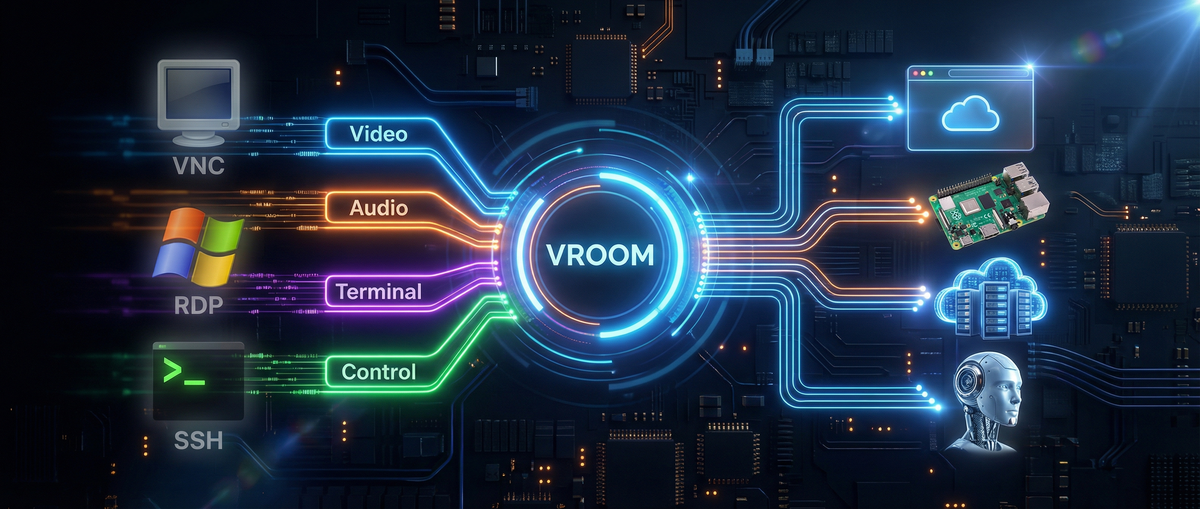
TL;DR: I built VROOM — Virtual Remoting Over OpenMux — because every existing remote access protocol is either ancient, proprietary, platform-locked, or all three. RDP assumes Windows. VNC assumes the 1990s. SSH assumes you only need text. Mosh assumes you’ll never need graphics. None of them run natively in a browser. None of them negotiate modern terminal capabilities. None of them multiplex graphical and terminal sessions over the same connection. VROOM does all of it — for humans remoting into servers, for developers using cloud IDEs, for IT teams managing fleets, for embedded engineers debugging Pis, and for AI agents. It’s not an AI protocol that happens to work for humans. It’s a remote session protocol designed for 2026 that also happens to be exactly what AI agents need.
I Have a Standards Problem
I should probably seek professional help.
Some people collect coins, or vintage guitars, or orange and black 3DS XLs. I collect protocol specifications.
I wrote the DOOR Framework because AI agents needed a sane way to talk to software. I helped build OpenMux because multiplexing channels over arbitrary transports shouldn’t require a PhD. And now I’ve written VROOM because I got tired of duct-taping SSH, VNC, and WebRTC together every time I wanted to do something that should be trivially simple: remote into a machine with a modern terminal and a graphical desktop over a single connection that works in a browser. The fact that VROOM also turns out to be the perfect protocol for AI agent sessions is a consequence of getting the fundamentals right — not the other way around.
“Standards are always out of date. That’s what makes them standards.” — Alan Bennett
He was talking about morals, but it applies perfectly to protocols.
The Problem: Remote Access Is Stuck in Three Decades Ago
Every remote access protocol in widespread use today was built for a world that no longer exists.
RDP shipped in 1998. VNC’s RFB protocol dates to 1998. SSH hit 1.0 in 1995. Even Mosh, the “modern” option, shipped in 2012 and hasn’t meaningfully evolved since. The newest entrants — Chrome Remote Desktop, Parsec, Moonlight — are proprietary products, not protocols. You can use them, but you can’t build on them.
Meanwhile, the world changed:
- Browsers became the universal client. Every device has one. None of these protocols run natively in it.
- Terminals got sophisticated. Kitty keyboard protocol, Sixel graphics, synchronized output, hyperlinks — none of which the transport layer knows about.
- Networks got unreliable and mobile. WiFi drops, cellular handoffs, NAT traversal — TCP-only protocols die on every one.
- AI agents entered the picture. Now the thing on the other end of the connection might not be a static desktop — it might be an autonomous agent you need to observe, collaborate with, and occasionally override.
The remote access stack wasn’t just designed for humans operating machines — it was designed for humans on wired networks operating Windows desktops using 1990s terminal emulators. Every assumption is stale.
Let’s look at what exists and why none of it holds up.
The Graphical Side
RDP (Remote Desktop Protocol) Microsoft’s crown jewel, born in 1998. RDP is genuinely impressive engineering — it understands Windows at the GDI level, compresses efficiently, and handles audio, clipboard, printers, and USB redirection. If you’re remoting into a Windows box, it’s excellent.
But RDP is married to Windows. The protocol itself is proprietary and baroque — the MS-RDPBCGR spec alone is over 400 pages. Running it in a browser requires gateway hacks. Running it on Linux requires xrdp, which is… fine. The way hospital food is fine.
VNC (Virtual Network Computing) VNC is the cockroach of remote desktop protocols — unkillable and somehow still everywhere. The RFB protocol it runs on is beautifully simple: here’s a framebuffer, here are your input events, go nuts.
The problem is that simplicity means everything is a bitmap. No concept of windows, applications, or semantic content. Compression is bolted on. Encryption is optional (and historically absent). Performance over the internet ranges from “acceptable” to “oil painting through a straw.” Audio? Not in the base protocol. Touch input? LOL.
Chrome Remote Desktop / Parsec / Moonlight These are the modern contenders. Chrome Remote Desktop uses WebRTC — smart. Parsec uses low-latency video encoding — brilliant for gaming. Moonlight piggybacks on NVIDIA GameStream. They’re all good at their specific use case.
But they’re all proprietary, closed-source, and single-purpose. None of them were designed to coexist with a terminal channel. None of them support AI agent interaction modes. And none of them are protocols you can build on — they’re products.
The Terminal Side
SSH (Secure Shell) The GOAT. SSH is 30 years old and still the backbone of every sysadmin’s life. It’s battle-hardened, universally supported, and does exactly what it was designed to do.
But SSH was designed in a TCP-only world. Drop your WiFi for 30 seconds? Dead connection. Roam from WiFi to cellular? Dead connection. Want to run it natively in a browser? You’ll need a WebSocket proxy and a JavaScript SSH implementation, at which point you’re basically pretending.
And here’s the one that kills me: SSH has no capability negotiation for modern terminal features. Your terminal emulator supports Kitty keyboard protocol? Sixel graphics? Synchronized output? SSH doesn’t know and doesn’t care. It’s a dumb pipe — which is a feature and a limitation.
Mosh (Mobile Shell) Mosh solved SSH’s biggest problem — network roaming — by switching to UDP and using a brilliant predictive local echo. It’s what SSH should have been for mobile networks.
But Mosh is stuck in 2012. No graphics passthrough. No Kitty keyboard support. No multiplexing. A single session over a single UDP connection. It solved one specific pain point beautifully and then… stopped.
xterm.js / Ghostty WASM / Terminal-in-Browser These are fascinating because they put real terminal emulators in the browser. xterm.js powers VS Code’s integrated terminal, GitHub Codespaces, and dozens of cloud IDEs. Ghostty recently shipped a WASM build. They connect to real PTYs on the server side, giving you genuine terminal experiences.
But they’re rendering layers, not protocols. They still need something to carry PTY data from server to browser — usually WebSocket, sometimes WebRTC data channels. That “something” is ad-hoc, per-product, and never standardized. Every cloud IDE reinvents this transport. Every time.
Enter VROOM
VROOM is two companion protocols — VROOM-Graphical and VROOM-Terminal — that run over the same OpenMux connection.
One connection. Both protocols. Simultaneously.
Think about what that means: you can view a remote desktop over VROOM-Graphical while having a terminal session open to the same machine over VROOM-Terminal. Same multiplexed connection. Same authentication. Same transport — whatever transport makes sense for your situation. WebRTC for peer-to-peer through NATs. WebSocket for browser compatibility. QUIC for mobile networks. TCP for your datacenter. The protocol doesn’t care.
This isn’t a niche AI thing. This is what remote access should be for everyone — and the fact that it also solves AI agent interaction is because the same properties that make a great remote session protocol (low latency, transport flexibility, capability negotiation, multiplexing, reconnection) are exactly what agents need too.
VROOM-Graphical: Remote Desktop, Rebuilt From First Principles
VROOM-Graphical uses WebRTC for media (H264 video, Opus audio) and OpenMux data channels for input. Right off the bat, that means it runs natively in any browser — no plugins, no gateway servers, no Java applets (remember those?).
It defines three interaction modes you can switch between at runtime:
- View — Stream the remote screen and audio. No input forwarded. Watch a deployment roll out. Monitor a kiosk. Observe an AI agent browsing. Whatever’s on the other end, you see it live.
- Interact — Full remote desktop. Your mouse moves their cursor. Your keyboard types their keys. Touch input included. This is VNC/RDP territory, but over WebRTC with modern codecs.
- Voice — High-level commands via voice or text. “Click the login button.” “Scroll down.” “Open the settings.” The remote end interprets intent instead of forwarding raw input events. This works for AI agents, but it also works for accessibility — voice-driven remote desktop for users who can’t use a mouse.
The mode switching is a single control message. Go from watching to driving in milliseconds.
The clever bit is the channel architecture. Mouse movement goes over an unreliable, unordered data channel — because if you lose a mouse position packet, the next one supersedes it anyway. Button presses and key events go over a reliable, ordered channel — because you absolutely cannot drop or reorder those. The channels are opened lazily when you enter Interact mode and closed when you leave. No overhead when you’re just watching.
VROOM-Terminal: “What SSH Would Be If We Designed It Today”
VROOM-Terminal is what happens when you look at SSH through the lens of 2026 and ask: what would we do differently?
First-class Kitty keyboard protocol support. Not passthrough-and-pray. Full capability negotiation. The client and server agree on what keyboard features are supported before the session starts. Level 3 Kitty keyboard (disambiguate everything, report all keys as escapes, report alternate keys, report all keys as key events) is a first-class citizen.
Kitty graphics and Sixel. The protocol knows about inline graphics and negotiates support during capability exchange. No more “does my terminal support this? guess I’ll find out when it either renders an image or barfs escape codes.”
Transport agnostic. WebSocket for browsers. WebRTC data channels for peer-to-peer. QUIC for modern networks. TCP for legacy. The terminal protocol doesn’t care — OpenMux abstracts it.
Real reconnection. Not “your session died, here’s a new one.” OpenMux-level session resumption means you can roam between networks and pick up exactly where you left off. Mosh-quality roaming, but with full terminal feature support.
CBOR control plane. All the negotiation, PTY setup, environment passing, and signaling happens over a structured CBOR control channel. No more parsing ASCII escape sequences to figure out what the server supports.
Here’s the comparison table from the spec:
| Feature | VROOM-Terminal | OpenSSH | Mosh |
|---|---|---|---|
| Transport | Any (WS, WebRTC, QUIC, TCP) | TCP only | UDP only |
| Kitty Keyboard | Native Level 3 | Passthrough only | None |
| Kitty Graphics / Sixel | Full negotiation | Works (passthrough) | No |
| Browser native | Excellent | Poor | No |
| Reconnection | Excellent (OpenMux) | Poor | Excellent |
| Multiplexing | Native | Good (ControlMaster) | Single session |
| Unified with Graphical | Yes (same connection) | No | No |
Where This Gets Interesting: Possibilities
Let me walk through concrete use cases — starting with the ones that have nothing to do with AI, because VROOM’s value proposition starts with being a better remote access protocol, full stop.
Replace VNC/RDP For Browser-Based Remote Desktop
The most obvious use case. Your IT team needs to remote into employee machines. Today that means RDP (Windows only), VNC (slow, insecure by default), or a proprietary product like TeamViewer or AnyDesk (subscription fees, closed source, and you’re trusting a third party with full desktop access).
VROOM-Graphical over WebRTC gives you: browser-native remote desktop with H264 video, Opus audio, full mouse/keyboard/touch input, NAT traversal built in, and an open protocol you control. No client software to install — just open a URL. The View/Interact mode split means your helpdesk can watch a user’s screen (View) and take over only when needed (Interact) without a mode toggle that confuses non-technical users.
Cloud IDEs That Don’t Suck
Every cloud IDE (Codespaces, Gitpod, Replit, etc.) has independently solved “terminal in browser” with bespoke WebSocket protocols. VROOM-Terminal gives them a standard. A real, documented, capability-negotiating standard that supports Kitty graphics, proper keyboard handling, and session resumption.
No more “why doesn’t my terminal look right in Codespaces.” The capability negotiation handles it.
And because VROOM-Terminal and VROOM-Graphical share the same OpenMux connection, a cloud IDE could offer a terminal and a graphical preview of the app you’re building over the same session. One connection, not two separate subsystems duct-taped together.
IoT and Edge Devices
A Raspberry Pi running vroomd gives you graphical desktop access (through VROOM-Graphical to its Wayland compositor) and terminal access over the same connection. WebRTC means it works through NATs without port forwarding. QUIC means it works well on cellular. The same protocol works on a Raspberry Pi and a cloud GPU instance.
Today, SSHing into a headless Pi behind a NAT requires either port forwarding, a reverse tunnel, or a third-party service like Tailscale. VROOM over WebRTC punches through NATs natively. And if you need to see the GUI (maybe it’s running a kiosk app, or a Home Assistant dashboard), VROOM-Graphical is right there on the same connection. No separate VNC setup.
Terminal Sharing, Pair Programming, and Live Demos
VROOM-Terminal’s multiplexing means multiple viewers can watch the same PTY. A presenter runs vroomd, shares a WebRTC link, and the audience gets a live terminal stream in their browsers — with proper Kitty graphics, sixel images, and synchronized output. No tmux hacks. No screen sharing software chewing through CPU.
For pair programming between humans: one person drives in Interact mode, the other watches in View mode. Switch who’s driving with a single message. It’s Google Docs-style collaboration but for a desktop or terminal session.
SSH Gateway: Upgrade Without Replacing
The spec recommends building thin gateways: vroom-to-ssh and ssh-to-vroom. This means VROOM doesn’t require replacing your SSH infrastructure. You put a gateway in front of your existing SSH servers, and suddenly they’re accessible via WebRTC in the browser with full capability negotiation.
Your fleet of 10,000 servers still runs sshd. Your users access them through a VROOM web client that speaks to the gateway. You get browser-native access, Kitty keyboard support, session resumption, and modern terminal features — without touching a single server config.
Adoption without revolution.
And Yes — AI Agents Too
Everything above works for human-to-machine remote access. But here’s the thing: once you’ve built a protocol that does browser-native remote desktop, transport-agnostic terminal access, capability negotiation, and mode switching — you’ve accidentally built the perfect protocol for AI agent interaction.
With VROOM-Graphical, you can watch your coding agent’s browser as it reads documentation, observe its terminal as it runs tests, and hear it explain what it’s doing — all in a single connection. When it gets stuck, switch to Interact mode, fix the CSS it’s struggling with, switch back to View, and let it continue.
The View/Interact/Voice modes map perfectly to the human-agent workflow: observe, take over, give high-level commands. But those same modes are equally useful for human-to-human remote support (View + Interact) and accessibility (Voice).
VROOM wasn’t designed for AI and then retrofitted for humans. It was designed for modern remote sessions, period. AI agents just happen to be the most demanding client — and if you satisfy them, you’ve satisfied everyone.
“But Why Not Just Extend SSH?”
Because SSH’s channel protocol is 30 years old and has no concept of capability negotiation at the terminal level. Bolting Kitty keyboard support, graphics negotiation, and transport abstraction onto SSH would require breaking changes to a protocol that billions of devices depend on. That’s not going to happen, and it shouldn’t.
SSH is perfect for what SSH does. VROOM is for everything SSH wasn’t designed to do.
The ssh-to-vroom gateway is the bridge. Use SSH for your existing infrastructure. Use VROOM for the new stuff — browser-based access, AI agent sessions, modern terminal features. They coexist cleanly.
“But Why Not Just Use WebRTC Directly?”
You can! VROOM-Graphical is WebRTC for the media layer. The value VROOM adds is the structured control plane on top. Raw WebRTC gives you a video stream and some data channels. VROOM gives you interaction modes, capability negotiation, lazy channel management, and a documented protocol that any client can implement.
It’s the difference between “we use HTTP” and “we have a REST API.” Same transport, but with the conventions that make interoperability possible.
Status and What’s Next
VROOM is draft (v0.2.0). Both protocols are published and open for feedback. The reference implementation is voxio-bot (being renamed to vroom-server), built on Pipecat, aiortc, and Playwright.
What I’m building next:
- vroomd — A production daemon supporting both protocols
- vroom-to-ssh gateway — The adoption bridge
- Browser client — A web-based VROOM client (xterm.js + WebRTC)
- CLI client —
vroom term user@hostwith the same UX as SSH
The protocols are MIT licensed. The specs are on GitHub. Standards only work if people use them.
“The nice thing about standards is that you have so many to choose from.” — Andrew Tanenbaum
True. But the nice thing about this standard is that it’s the first one designed for 2026 — where your remote session might be in a browser, over a cellular network, through a NAT, to a Raspberry Pi, a cloud VM, or an AI agent that talks back. And it handles all of them the same way.
VROOM is open source at vroom.md. The specs are at VROOM-Graphical and VROOM-Terminal. OpenMux is at github.com/visionik/socketpipe. Come build with us.