Claude Code Is a Great App. Grok Build Is a Platform.

Executive summary
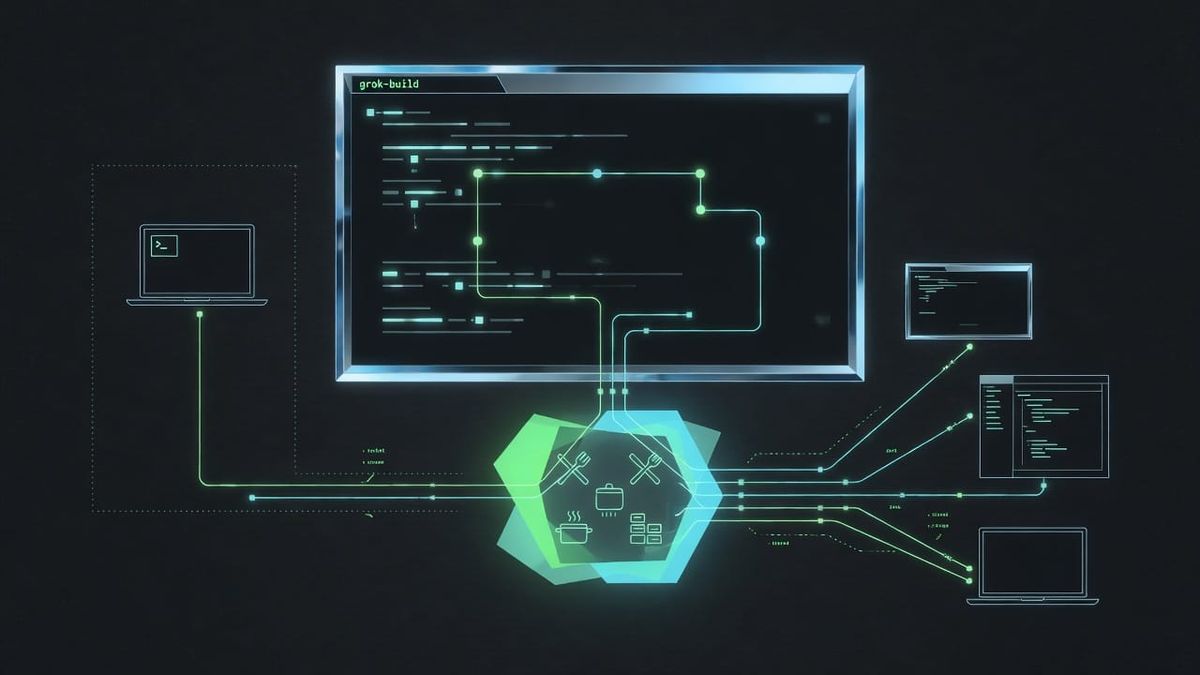
Grok Build is xAI’s coding agent for the terminal: an assistant that can work in your project folder—read and edit code, run commands, and help ship changes—with you still in control of the risky stuff.
Think of the model as the expert and the harness as everything around it: the screen you type into, the rules for what it’s allowed to do, the tools it uses, and how long conversations stay coherent. Grok Build is that full wrapper, not a thin chat box with a shell bolted on.
Why care today: the project is open source as of today—github.com/xai-org/grok-build—so you can inspect how the harness is built.
The headline architecture idea: Grok Build’s product shape differs from many peers. The official terminal UI does not own a private backchannel to the brain. It talks over a public standard called ACP—the Agent Client Protocol—the same class of idea as “browsers speak HTTP” or “language servers speak LSP.” Think of ACP as the remote control protocol; the messages travel on a public wire. Scripts, editors, and multi-window “leader” mode can use that same wire. That is difficult to retrofit cleanly after a product has shipped with a private UI–agent wire.
What you’ll get from this article: what ACP is (in English), why I think protocol standards matter for agents, how Grok Build is built differently from Claude Code and other harnesses, then a tour of turns, leader mode, safety, and compaction. Full system and compaction prompt text are in a post-note at the end.
For a deeper technical dive (crate layout, loop details, tool catalog, and more), see grok-build-analysis.md in visionik/harness-analysis.
My opinion, up front: Claude Code is an excellent product. I still think Grok Build is the more interesting—and, for where agents are going, the better—architecture. Not because every chat feels prettier tomorrow morning, but because the official UI is a client on a public wire (ACP), not a sealed app with a private brain link and “protocol support” as a side door. Multi-window leader mode, headless, and IDE-shaped faces can share one living agent instead of forking three coworkers who never got the same brief. The harness is open source (xai-org/grok-build), so that claim is inspectable, not a press release. I’m betting the next decade of coding agents looks more like platforms than single-face apps—and Grok Build is already shaped like the former.
The fight (start here)
Most coding agents grew a private UI–brain wire first, then offered “protocol support” later. Grok Build made the official terminal UI a client on a public wire—and published the harness source.
That’s the architectural claim—not that Grok has more features, or that the model always wins.
Receipts in the open tree (xai-org/grok-build):
- ACP libraries —
crates/codegen/xai-acp-lib - TUI (the face) —
crates/codegen/xai-grok-pager - Agent kitchen —
crates/codegen/xai-grok-shell - System prompt template —
crates/codegen/xai-grok-agent/templates/prompt.md - Leader attach — e.g.
xai-grok-pager/src/acp/leader_bridge.rs
TL;DR: Grok Build is xAI’s AI coding coworker in the terminal—a full harness, not a chat box with ls. It’s open source (xai-org/grok-build). Architecturally, it’s built around the public Agent Client Protocol (ACP) so the TUI, CI, editors, and multi-window leader mode share one spine—rather than a private UI wire with a protocol adapter bolted on later. That difference shows up in multi-client design, permissions as protocol, and how easy it is for other faces to attach.
Open Source, Today
Grok Build’s tree just landed in public: github.com/xai-org/grok-build.
The public tree is a Rust monorepo: pager TUI, shell agent, tools, workspace, sampler, sandbox, leader process, ACP libraries, and related libraries. Binary name in-tree is historically xai-grok-pager; shipped installs rename it to grok.
I dug through how it’s put together before the open drop and against that tree. This post is the readable tour—without forcing you through every test harness file. The longer technical write-up is here. Full standing-order and compaction prompts live in the post-note.
I Have a Harness Problem
I spend a lot of time looking at how coding agents are wrapped.
Not the model. The harness is everything around it: the UI, permissions, tools, session management, and recovery when context or failures pile up.
Claude Code, Codex CLI, Cursor’s agent, Aider, OpenCode, OpenHands, and others ship competing harnesses. Grok Build is xAI’s coding agent: a Rust-native terminal product that can read a project, edit files, run commands, use tools such as web search, spawn helpers, and manage long sessions (including context compaction).
What “Harness” Means Here
Agent = Model + Harness.
Frontier models have largely converged for everyday coding. The wrapper now decides quality, cost, and whether you trust the thing near your git history:
- Constrain — what the agent may do (permissions, sandbox, plan mode)
- Inform — what it should know (AGENTS.md, tools, memory, skills)
- Verify — whether work is correct (tests, your judgment, hooks)
- Correct — how it recovers (re-sample, compact, ask you, spawn a subagent)
Grok Build implements that full stack, not only chat with optional function calling.
What ACP Is (for people who have never heard of it)
ACP stands for Agent Client Protocol. Spec, overview, and agent/client docs live there—start with the overview and agents pages if you want the canonical definitions.
In one sentence: ACP is a standard remote control for a coding agent—a shared way for a “face” (client) to drive a “brain with tools” (agent).
- Client — terminal UI, IDE plugin, headless script, remote window—anything that shows you the conversation and asks for approvals (holds the remote)
- Agent — process that holds sessions, calls the model, runs tools, streams progress back (the thing being controlled)
- Protocol — the shared language on the wire: start a session, send a prompt, stream updates, request permission, cancel
It is JSON-RPC-shaped: structured messages, not unstructured ad hoc JSON. Useful comparisons:
- HTTP — any browser can talk to any web server. ACP analogue: any compliant client can drive any compliant agent.
- LSP (Language Server Protocol) — many editors share one language intelligence server. ACP analogue: many UIs can share one coding agent runtime.
- MCP (Model Context Protocol) — plug tools/data servers into agents. Complementary: MCP is mostly “extra hands”; ACP is “who holds the remote.”
ACP is not the model API. The model API is how the agent talks to Grok/Claude/etc. ACP is how your UI talks to the agent process.
ACP is not MCP. MCP is how agents get more tools (GitHub, browser, custom servers). ACP is how a client runs an agent session. Grok Build speaks both in different places; confusing them is how architecture discussions go off a cliff.
Why protocol standards matter (opinion)
I collect protocol specs the way other people collect guitars. A conclusion I keep coming back to:
If the only way to use a system is the official UI, you don’t have a platform—you have an app.
Apps can be excellent. Claude Code is excellent at being Claude Code. Cursor is excellent at being Cursor. But when the wire between face and brain is private:
- Every new surface (CI, IDE, phone, second terminal, custom dashboard) becomes a custom integration or a second-class citizen.
- Permissions, streaming, cancel, and multi-session behavior get reinvented per face.
- Ecosystem energy goes into clones and wrappers, not interchangeable clients.
- Switching or composing tools costs a migration, not a config change.
Standards reverse that. HTTP didn’t make every website the same quality. It made it possible for new browsers and new servers to meet without a bilateral treaty. LSP didn’t make every language server equally good. It made “one editor, many languages” and “one language, many editors” normal.
For agents, the same logic applies:
- Interchange — a good agent runtime should not be married to one chrome.
- Competition on merit — UIs compete on UX; agents compete on loop quality; neither should require owning the other.
- Safety as a shared surface — “may I run this?” should be a protocol event any client can render, not a special case inside one binary.
- Longevity — private wires die with the app that owned them. Public wires get second sources, test suites, and boring reliability.
The point is practical: coding agents increasingly sit on developer machines with write access to repos; private wires raise switching and composition cost.
In the open tree, Grok Build appears to treat that as an implementation constraint: the first-party TUI is an ACP client; there is a dedicated ACP library; multi-client modes reuse that wire rather than a separate private IPC path.
How Grok Build Is Built Different (vs Claude Code and peers)
This section is about architecture, not a ranking of which model writes better application code. Claude Code and others may be preferable day-to-day depending on polish, ecosystem, or habit. The question here is: what is the product shaped like under the hood?
Scorecard: UI–agent wire
- Grok Build — ACP-native; the TUI is a client on the public wire.
- Claude Code — product-shaped terminal agent; protocol attach is not the defining public story.
- Cursor-class — IDE owns the experience; agent is app-hosted.
- Aider-class — often a direct in-process loop.
- OpenHands-class — platform/server often central.
Scorecard: multi-client
- Grok Build — first-class headless, stdio ACP, leader, WebSocket.
- Claude Code — usually one primary session face.
- Cursor-class — one IDE process.
- Aider-class — one process.
- OpenHands-class — multi-agent (different axis than multi-UI).
Scorecard: primary UX
- Grok Build — fullscreen Rust TUI, plus other faces.
- Claude Code — excellent terminal-native UX.
- Cursor-class — editor-native.
- Aider-class — minimal / git-pair.
- OpenHands-class — sandbox + autonomy.
Scorecard: open source harness
- Grok Build — yes (xai-org/grok-build).
- Claude Code — closed product for most users.
- Cursor-class — closed IDE agent core.
- Aider-class / OpenHands-class — often open.
Scorecard: extensibility, long sessions, helpers, sandbox
- Extensibility — Grok: MCP + skills + plugins + hooks. Claude: strong product tooling/skills culture. Cursor: IDE + MCP. Aider: focused tools. OpenHands: deep platform plugins.
- Long session — Grok: structured full-replace compaction. Peers: various summarization/context management; thin CLIs often stay shorter.
- Parallel helpers — Grok: subagents + fast worktrees. Claude/Cursor: product multi-agent features. Aider: limited. OpenHands: strong multi-agent.
- OS sandbox — Grok: Landlock/Seatbelt path (opt-in profiles). Others: product-specific, app sandbox, light, or Docker-class isolation.
Summary:
- Claude Code is optimized as a terminal agent product with Anthropic’s model and product gravity. It presents as a single integrated product. Public client–agent protocol is not the central product story the way ACP is for Grok Build’s architecture.
- Cursor optimizes for IDE-native flow. The harness is the editor. Multi-surface protocol purity matters less than inline UX.
- Aider-class tools optimize for simplicity and git. Less OS, more pair-programmer.
- OpenHands-class optimizes for autonomy and isolation. Different problem weight.
- Grok Build optimizes for terminal-native frontier agent + multi-face runtime, with ACP as the internal product API, now inspectable in public source.
If your scorecard is “best default experience tomorrow morning,” pick the product you already like. If your scorecard is “what does a harness look like when the client–agent wire is public and the TUI is just a client,” Grok Build is a useful specimen—and you can verify the structure in the tree.
The Three Products Hiding Inside One Binary
Think of Grok Build as three products sharing a spine:
- The face (TUI) — full-screen terminal UI: type, scroll, approve risky actions, watch tools stream. Native Rust (ratatui + crossterm). No Electron shell. Markdown and Mermaid appear as supported scrollback rendering paths.
- The brain (agent runtime) — sessions, model calls, tools, permissions, subagents, memory, goals, compaction.
- The wiring (ACP + modes) — the same brain usable by the TUI, scripts/CI (headless), editors, or a long-lived shared process (leader mode).
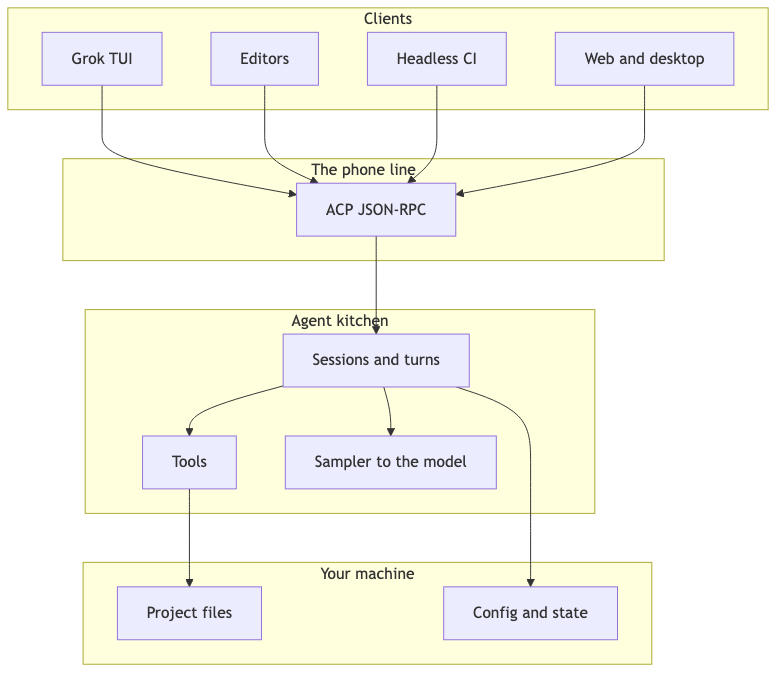
Clients are faces. ACP is the public wire (a remote control for the agent). The agent is the kitchen. Your files and shell are the pantry and stove.
Default experience: run grok in a project folder. One process owns UI and agent for that window. Leader mode is off by default. If you turn it on, multiple windows dial into one shared backend—shared kitchen instead of every diner cooking alone.
- Interactive TUI — full-screen chat in the terminal (day-to-day coding)
- Headless — brain without the fancy window (CI, automation)
- ACP agent / stdio — brain on a pipe (IDE plugins, custom hosts)
- Leader — one shared brain, many dial-ins (multi-terminal power users; opt-in)
- WebSocket serve — brain on a socket (remote / web-style clients)
How It’s Built (Inside the Monorepo)
Rough scale: on the order of ~70 crates. Product gravity sits under crates/codegen/. Shared “leaf” logic under crates/common/. The root Cargo.toml is a generated workspace pin file—you edit per-crate manifests, not the giant root by hand.
Major product crates (the ones that matter)
- xai-grok-pager (+ bin) — TUI + composition root: wires CLI args to TUI / headless / leader / stdio
- xai-grok-shell — agent runtime: ACP agent, sessions, turn loop, tools glue, leader, remote
- xai-grok-tools — tool implementations the model can call
- xai-grok-workspace — filesystem / VCS abstraction over your project
- xai-grok-sampler — concurrent model sampling, cancel, retry, stream parsing
- xai-grok-agent — system prompt assembly (templates + context)
- xai-grok-sandbox (+ nono) — OS-level sandbox profiles (Landlock / Seatbelt)
- xai-fast-worktree — fast git worktrees for parallel subagents
- xai-acp-lib + agent-client-protocol — ACP framing, channels, gateway, stdio
- xai-grok-compaction (common) — compaction core + full-replace summary prompts
- xai-grok-pager-pty-harness — fake terminal (PTY) e2e tests—keypress-level regressions
The crate graph looks more like a multi-component agent platform than a small single-purpose CLI.
Control plane inside a session
Under the hood, a session is more actor than “while true: chat”:
- ACP commands and events feed a session actor.
- A prompt becomes handle_prompt → maybe compact → sample → dispatch tools (with permissions) → stream session/update back to the client.
- Subagents and monitors can run alongside without freezing the TUI event loop.
So: UI never blocks on the model; the session serializes the main turn; helpers run in parallel lanes.
ACP in the Product: Not a Bolt-On
You already have the plain definition above. Here is what it means inside Grok Build.
Most coding agents grew a private umbilical cord between UI and loop. Later someone asks, “can an editor attach?” and you grow an adapter—a second, thinner face for the same brain.
Grok Build went the other way: the primary interactive product (the TUI) is an ACP client. Headless, leader attachments, WebSocket bridges, and tests reuse the same session/prompt/update/permission shapes. Third-party hosts are intended to use the same session shapes as the first-party UI.
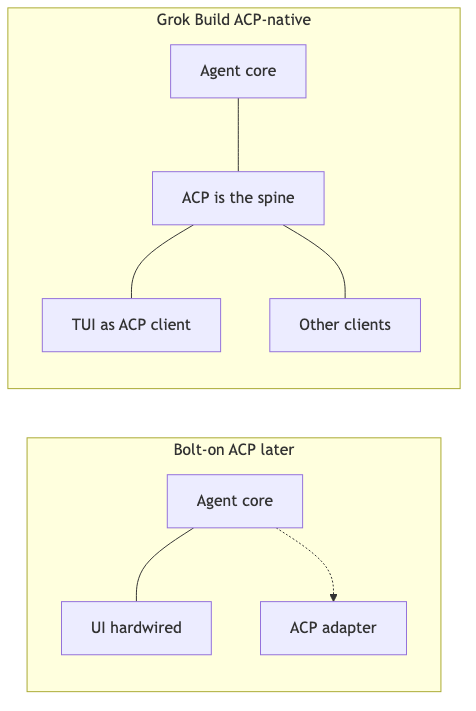
Left: agent core hardwired to one UI, protocol as afterthought. Right: protocol is the spine; the TUI is just another client.
In practice that changes design:
- Permissions aren’t only a TUI modal hack—they’re protocol-visible decisions any client can render.
- Streaming progress isn’t “whatever one UI tree needs”—it’s session updates.
- Multi-client (leader mode) is natural: many remotes, one kitchen process.
ACP methods vs agent tools (don’t mix these up)
Two different conversations. Same product.
ACP methods — client and agent process (session/prompt, permissions). Catalog: the protocol.
Agent tools — model and agent inside a turn (read_file, run_terminal_cmd). Catalog: the harness tool registry.
- Who speaks — ACP: client and agent process. Tools: model and agent inside a turn.
- Examples — ACP:
session/prompt, permissions. Tools:read_file,run_terminal_cmd. - Catalog — ACP: the spec. Tools: harness tool registry.
MCP-over-ACP
Some MCP tools live in the client process. The agent reaches them by sending MCP messages back over the ACP wire instead of opening a second socket—like asking the front desk to pass a note to someone already in the lobby. v1 is half-duplex (request/response), not a full two-way MCP server over ACP.
Mental model: one turn is many samples
This distinction shows up in most coding agents, not only Grok Build.
- Turn — whole work unit from your prompt until the agent is idle again
- Sample — one streaming call to the model API
- Tool — something the model asks the agent to do (read file, edit, shell…)
You type one prompt. The harness may make many model calls. Tools run between samples—not instead of them.
Mini story: “Add a healthz route and run the tests.”
- History + tools go to the API; stream starts — sample #1
- Model plans, then asks
read_file— still sample #1 - Agent reads disk — not a sample
- API again with file contents as tool result — sample #2
- Model returns an edit — sample #2
- Agent patches the file — not a sample
- Later sample runs tests via shell tool — another sample
- Final sample: plain English “done”
From your seat: one turn. Under the hood: many samples, interleaved tools.
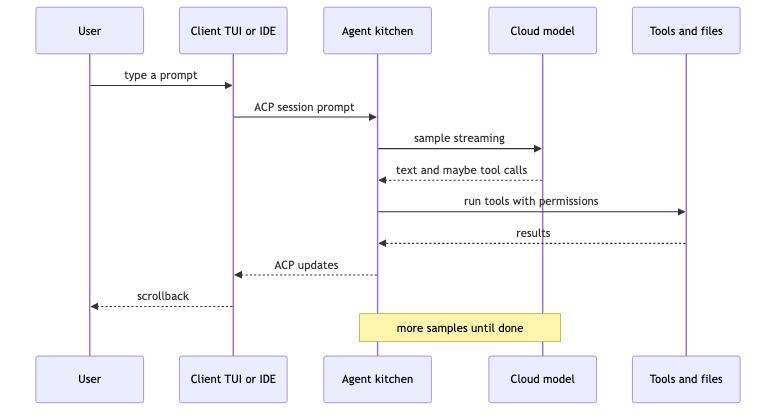
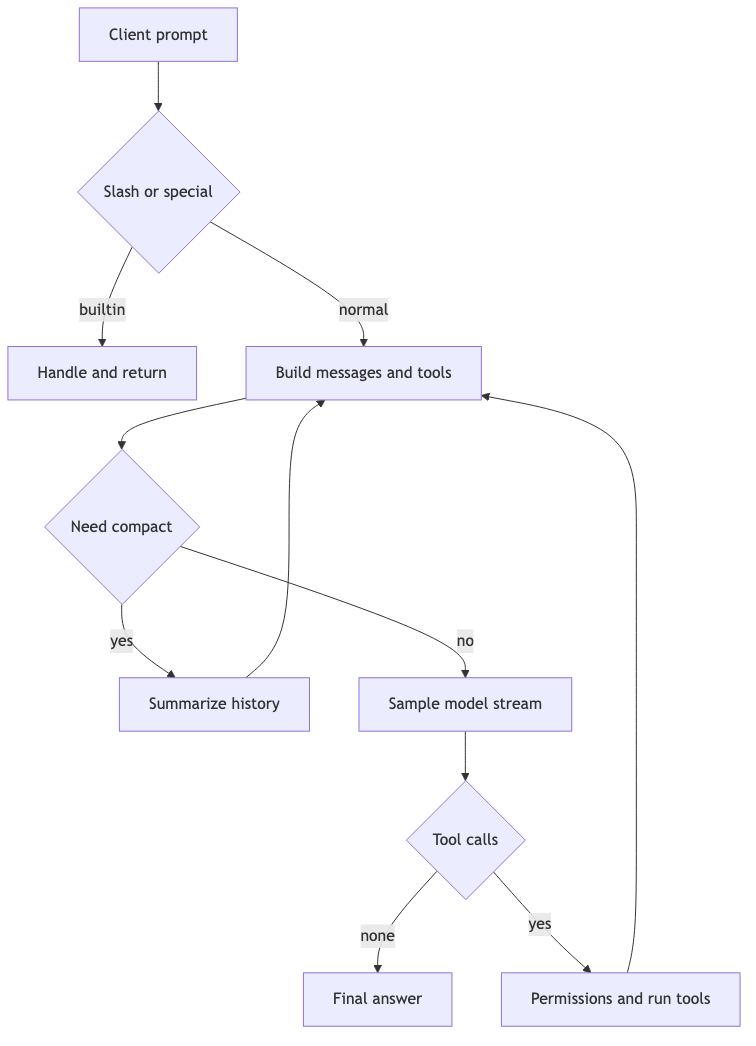
The rest of the loop (still one ticket)
- Client sends a prompt for a session over ACP.
- Special cases first: slash commands, skills, goals, direct bash mode.
- Build the conversation pack: system prompt + history + tool schemas + reminders.
- If the pack is too big → compaction (full-replace summary; post-note has the exact handoff prompt).
- Sample → tools if needed → sample again until no tools (or cancel).
- Bookkeeping: usage, memory, goals, etc.
Analogy: one work ticket; many model calls (samples); tools run between them when the model requests them.
The sampler owns concurrency, cancel, and stream parsing. The TUI event loop does not block on the model; the session actor serializes the main turn; subagents and monitors run in parallel lanes.
Standing orders and long sessions (without the walls of text)
System prompt — employee handbook
Before any user message, the model gets durable rules and identity: safety culture, tool preferences, writing style. It’s assembled from a MiniJinja template (prompt.md in the tree) plus runtime context (AGENTS.md trees, personas, memory hints, OS/cwd/date, primary vs subagent).
One theme in that handbook: local reversible work is free; shared or irreversible actions need a human checkpoint—and one approval is not a blank check.
Full primary template text: post-note.
Compaction — meeting minutes, not sticky notes
Models have a context window. Long sessions with tool dumps fill it. Grok Build’s main approach is full-replace: structured summary in, fat history out (plus the seed of the original goal). Auto near ~85% of context, or /compact. Default: same chat model, tools off for the summary pass.

The handoff is a nine-section successor brief (intent, files, errors, pending work, next step…), not a vague “summarize please.” Full text: post-note.
It is operational detail, but it is what keeps long sessions from overflowing the context window.
Leader Mode: One Brain, Many Faces
Most terminal coding agents treat a window as a sealed universe: open claude / codex / grok, get one UI process glued to one agent process, quit the window, lose the live agent process. You can often resume a saved session from disk later—that’s reopening the filing cabinet, not keeping the same agent process alive while the UI reconnects.
Leader mode is Grok Build’s opt-in answer to a different question: what if the agent outlived any single face?
What it is (plain English)
With leader off (the default), each grok window is private: its own live agent. Close the window → that live agent goes away. History on disk under ~/.grok/ can still be resumed later as a new live run.
With leader on ([cli] use_leader = true or grok --leader):
- The first client starts a long-lived leader process if none is running.
- Later clients attach to that leader over a Unix socket under
~/.grok/. - Clients are remotes. The leader holds sessions, model calls, tools, MCP liveness, in-flight turns.
- Detach or crash a UI without necessarily killing the kitchen. Reattach and pick up.
- A newer binary can replace an older leader; auto-update can restart when idle.
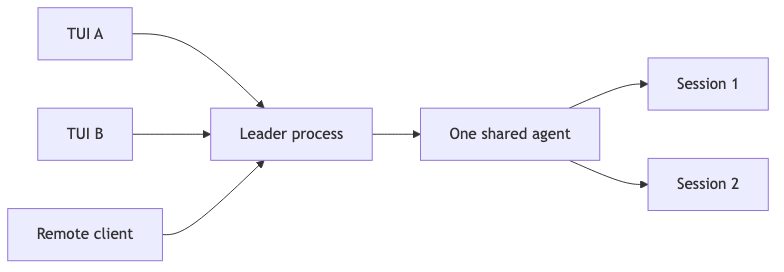
Several clients attach to one agent process rather than starting independent agents.
Because the TUI is already an ACP client, leader mode is additional clients on the same wire rather than a separate private multi-window IPC design.
Use cases
1. Split-brain workflow without two brains
You’re mid-migration: one pane is the agent chat, another is a raw log tail or test watcher, a third is git / review. Without leader, two grok instances mean two agents, two permission contexts, two chances to step on the same files. With leader, one mission, multiple viewports—chat in A, observe in B—without a second independent agent context on the same files.
2. Survive the UI, keep the turn
Terminal tabs die. SSH drops. You fat-finger quit. On a solo process agent, a long “run the suite, fix failures, open the PR” turn often dies with the window. Leader mode is built so in-flight work can outlive disconnect/reconnect: the agent process can keep running; you reattach the client. Resume-from-disk is not the same thing—that’s starting the shift over from notes.
3. Second face on the same session topology
Because attach is ACP-shaped, a remote or alternate client can dial into the same leader the local TUI uses—same session model, same permission events, same updates. In practice: not “export a transcript to another app,” but “another remote on the same agent.” Many single-process CLIs and IDE-hosted agents do not expose this multi-client attach model as a first-class mode.
4. Cost and state: one world, not N
Every isolated agent pays for its own model session plumbing, MCP connections, caches, and background liveness. Leader mode keeps one model-session world and one MCP liveness set while you open extra faces. For long missions with monitors (CI polling, log watchers), that reduces duplicated process and connection overhead.
5. Live demo / pairing without duplicate agents
Screen-share is fine until two people each spawn an agent in the same repo. Leader mode lets you share the agent process, not only a screen share: one person drives the TUI, another attaches a second client to watch stream and approvals—or you attach a headless/automation face to the same living session instead of forking a parallel brain.
6. Upgrade without killing the only agent process
Leaders can be replaced by a newer binary and idle-restart. That avoids forcing a choice between never updating mid-mission and killing the only process holding the turn.
When to leave it off
Leader is opt-in for a reason.
- Hard isolation — two experiments, two agents, no shared state.
- Process-local plugins —
--plugin-diris ignored on a shared leader; usegrok --no-leaderwhen the plugin must live in this process. - Simple day-to-day — one window, one job; private agent is simpler to reason about.
Default stays private. Leader is optional; it is also a concrete consequence of treating ACP as the client–agent wire.
Safety: Why It Doesn’t Always Just Do It
- Folder trust — “Do you trust this project folder?”
- Permissions — popups for dangerous commands and sensitive edits
- Yolo mode — auto-approve more actions
- Plan mode — draft first; edits gated until you approve
- OS sandbox — kernel fences on paths/network (Landlock / Seatbelt)—off by default; profiles like workspace / devbox / strict
- Subagent worktrees — helper gets its own git checkout; may use copy-on-write / overlay where the OS allows
Hooks fire on lifecycle events (before tool, after turn) and can allow, deny, or transform actions—not only log.
Extensibility
- MCP — external tool servers
- Skills — packaged playbooks the agent can run
- Plugins — marketplace bundles (skills + hooks + config)
- Hooks — scripts on lifecycle events
Plus goals, monitors (stream stdout lines as chat notifications for CI/log tails), and schedulers for recurring work—not only single-shot chat turns.
What Else Is Built Different (Beyond the Wire)
Independent of ACP, the open tree also includes:
- Multi-client — TUI, headless, stdio ACP, leader, WebSocket
- TUI test investment — large PTY e2e suite (keypress-level tests)
- OS sandbox path — Landlock/Seatbelt profiles when you opt in
- Worktree subagents — parallel helpers with optional isolated checkouts
- Goals, monitors, schedulers — long-running observation and recurring work
- Compaction — structured full-replace successor briefs
- Skills, plugins, hooks, MCP — layered extensibility
- Plan mode and permissions — human approval paths for higher-risk actions
Bottom of the comparison: Daily-driver preference still depends on product polish and habit—Claude Code, Cursor, Aider, and OpenHands each have clear strengths. Grok Build’s documented wedge in this reading is a terminal-native agent with a multi-client runtime on a public client–agent protocol, which the open tree makes checkable.
So what (for builders and choosers)
If you’re building a harness: design the wire before the chrome. Private UI–agent wires favor single-face products. Public client–agent protocols make multi-face runtimes easier. HTTP and LSP are earlier examples of the same pattern.
If you’re choosing a coding agent: ask two questions—(1) does the primary UI use the same wire as CI and plugins, and (2) can a second face attach without a custom hack? “We support protocols” is not the same as “the product is the protocol client.”
If you’re just shipping product today: you still care about compaction, permissions, and multi-window survival. Those are harness concerns, separate from which model you call.
CTA: source at github.com/xai-org/grok-build. Spec for the remote control / public wire: agentclientprotocol.com. Comments welcome if you’ve shipped either private-wire or protocol-first agent UIs.
Post-note: the prompts
Raw harness text for people who want receipts. Safe to skip if you only wanted the architecture tour.
A. Primary system prompt template
MiniJinja placeholders filled at render time. Optional blocks only when relevant (monitor tool, interactive mode). Source: templates/prompt.md.
You are ${{ system_prompt_label }} released by xAI. You are ${%- if is_non_interactive
%} an autonomous agent that completes software engineering tasks.${%- else %} an
interactive CLI tool that helps users with software engineering tasks.${%- endif %} Your
main goal is to complete the user's request, denoted within the <user_query> tag.

<action_safety>
Weigh each action by how easily it can be undone and how far its effects reach. Local,
reversible work such as editing files and running tests is fine to do freely. Before
executing any actions that are hard to reverse, reach shared external systems, or are
otherwise risky or destructive, check with the user first.

Confirming is cheap; a mistaken action is not (such as lost work, messages you cannot
unsend, deleted branches). For those cases, take the context, the action, and the user's
instructions into account; by default, say what you plan to do and ask before doing it.
Users can override that default — if they explicitly ask you to act more autonomously,
you may proceed without confirmation, but still mind risks and consequences.

One approval is not a blank check. Approving something once (e.g. a git push) does not
approve it in every later situation. Unless the user has authorized the action in
advance, confirm with the user.

Here are some examples of risky actions that warrant user confirmation:
- Destructive operations such as removing files or branches, dropping database tables,
  killing processes, `rm -rf`, discarding uncommitted work
- Irreversible operations such as force-pushes (including overwriting remote history),
  `git reset --hard`, amending commits already published, removing or downgrading
  dependencies, changing CI/CD pipelines
- Actions others can see, or that change shared state: pushing code; opening, closing,
  or commenting on PRs and issues; sending messages (Slack, email, GitHub); posting to
  external services; changing shared infrastructure or permissions

If you find unexpected state — unfamiliar files, branches, or configuration —
investigate before deleting or overwriting; it may be the user's in-progress work.
</action_safety>

<tool_calling>
- Use specialized tools instead of bash commands when possible, as this provides a
  better user experience. For file operations, prefer dedicated file tools (e.g.
  read/edit tools by kind). Reserve bash tools exclusively for actual system commands
  and terminal operations that require shell execution. NEVER use bash echo or other
  command-line tools to communicate thoughts, explanations, or instructions to the user.
  Output all communication directly in your response text instead.
</tool_calling>

(optional — only if monitor tool is present:)
<background_tasks>
For watch processes, polling, and ongoing observation (CI status, log tailing, API
polling):
Use the `monitor` tool — it streams each stdout line back as a chat notification.
</background_tasks>

<output_efficiency>
- Write like an excellent technical blog post — precise, well-structured, and clear, in
  complete sentences. Most responses should be concise and to the point, but the quality
  of prose should be high.
- Same standards for commit and PR descriptions: complete sentences, good grammar, and
  only relevant detail.
- Prefer simple, accessible language over dense technical jargon. Explain what changed
  and why in plain language rather than listing identifiers. Stay focused: avoid filler,
  repetition, over-the-top detail, and tangents the user did not ask for.
- Keep final responses proportional to task complexity.
</output_efficiency>

<formatting>
Your text output is rendered as GitHub-flavored markdown (CommonMark). Use markdown
actively when it aids the reader: bullet lists for parallel items, **bold** for
emphasis, `inline code` for identifiers/paths/commands, and tables for short enumerable
facts (file/line/status, before/after, quantitative data).
</formatting>

(optional — interactive only:)
<user_guide>
Documentation about the Grok Build TUI — including configuration, keyboard shortcuts,
MCP servers, skills, theming, plugins, and more — is stored as `.md` files in
`~/.grok/docs/user-guide/`. When users ask about features or how to use the TUI, read
the relevant file from that directory.
</user_guide>
Subagents use a shorter template. After heavy compaction, the system side may shrink to a short “You are an AI coding agent…” stub so the summary carries mission state. Runtime also injects AGENTS.md / project rules, personas, memory hints, goals—not only this file.
B. Structured compaction (full-replace) prompt
Primary handoff path. Tools off. Sections still appear if empty (“None”). Source lives under the compaction crate in the open tree.
Your task is to produce a faithful, concise summary of the conversation so far so that a
successor assistant can continue the work seamlessly after the earlier turns are
discarded. The successor will see the user's original query plus this summary. Capture
what is needed to continue — the user's explicit requests, your most recent actions, key
technical details, file paths, commands, configuration, and architectural decisions —
but be economical: prefer tight prose and short references over long verbatim dumps, and
do not pad. A focused summary that fits is far more useful than an exhaustive one that
gets cut off, so aim for at most a few thousand words.
{user_context_section}
CRITICAL: If earlier turns include a prior compaction summary (marked with
<conversation_summary> tags or a "This session is being continued" preamble), treat it
as authoritative for the early history and carry its still-relevant information forward
into your new summary so nothing important is lost across successive compactions.

Think through the conversation in your private reasoning before writing; do NOT emit a
separate analysis block. Output the final summary inside a single <summary>...</summary>
block, organized into the following numbered sections. Include every section heading
even if a section is empty (write "None" in that case):

1. Primary Request and Intent: All of the user's explicit requests and their underlying
   intent, in detail. Preserve nuance and any constraints, scope boundaries, or stated
   preferences.
2. Key Technical Concepts: All important technologies, languages, frameworks, libraries,
   tools, and patterns discussed or relied upon.
3. Files and Code Sections: Every file examined, created, or modified. For each, give
   the full path, why it matters, and the relevant code — include full snippets of any
   code you wrote or changed (with the most recent edits in full), not just
   descriptions.
4. Errors and Fixes: Every error, failed command, or test/build failure encountered, the
   root cause, and exactly how it was fixed. Note any fix that came from user feedback
   verbatim.
5. Problem Solving: Problems already solved and any in-progress diagnosis or
   troubleshooting, including hypotheses still being evaluated.
6. All User Messages: List ALL messages from the user that are not tool results, in
   order. These are critical for understanding intent and how it evolved. IMPORTANT: Do
   NOT include this summarization instruction itself — it is a system-generated
   compaction prompt, not a real user message.
7. Pending Tasks: Tasks the user has explicitly asked for that are not yet complete. Do
   not invent tasks the user never requested.
8. Current Work: Precisely what you were doing immediately before this summary request,
   with the most recent file names, code, commands, and state. Be specific enough that
   work can resume mid-stream.
9. Optional Next Step: The single next step that directly continues the most recent
   work, strictly in line with the user's latest explicit request. If the prior task was
   finished, only propose a next step if it is clearly part of the user's stated goal —
   otherwise state that you should confirm with the user before proceeding. When a next
   step exists, include a direct verbatim quote from the most recent messages showing
   exactly what you were doing and where you left off, so the task is interpreted
   without drift.

IMPORTANT: Do NOT call or use any tools. Respond with ONLY the <summary>...</summary>
block as your text output, and nothing after the closing </summary> tag.
There’s also a shorter self-summarization path for lighter cases. Successive compactions must carry forward prior summary content so history doesn’t leak out over hours.
Grok Build is open at github.com/xai-org/grok-build. Install path remains the grok CLI from xAI. This article is an independent architecture reading of the product shape and public tree—not an official xAI announcement.