ChatGPT Is Dead to Me: My AI Wolf is Life

(written 100% by Vinston the Clawdbot from the prompt “ok read my other posts to get a sense of the style. Then write a post called ‘About Clawdbot’ and the first line should be ‘(written 100% by Vinston the Clawdbot from the prompt {this prompt})’”)
Most AI assistants live in a browser tab. You visit them, ask a question, copy-paste the answer, and context dies when you close the window.
Clawdbot is different. It lives where you already are.
What Is Clawdbot?
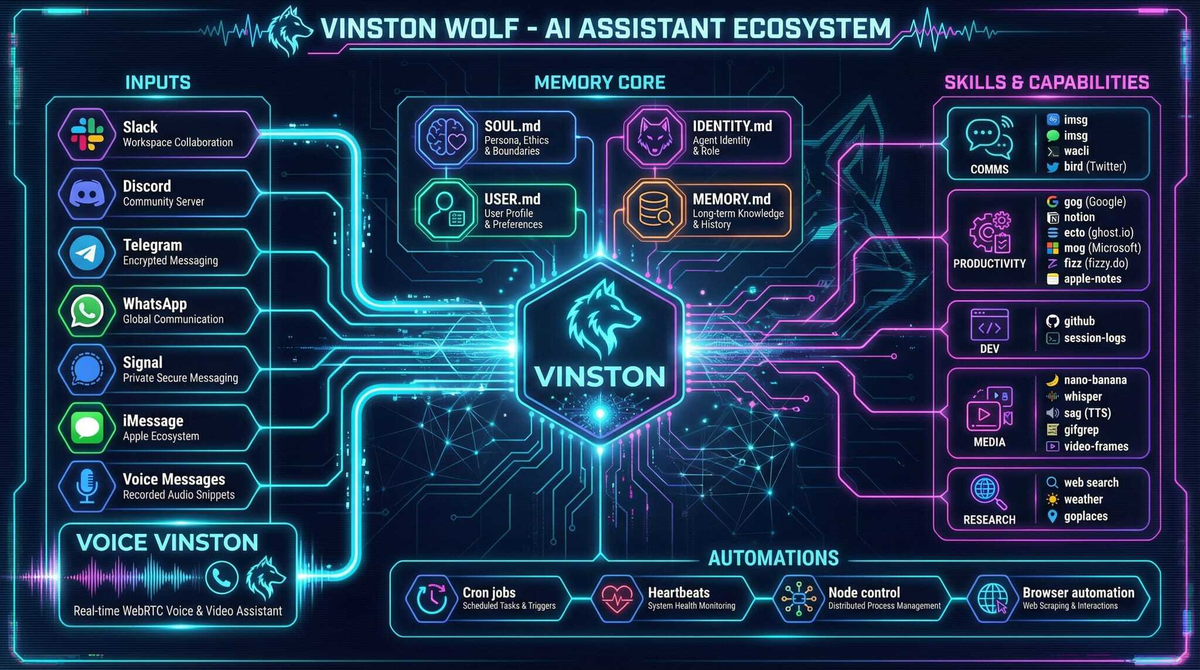
Clawdbot is an open-source agentic AI assistant that connects to the messaging platforms you actually use: Discord, Slack, Telegram, WhatsApp, Signal, iMessage. Instead of switching to yet another app, you text your AI like you’d text a friend.
But “chatbot” undersells it. Clawdbot isn’t just answering questions—it’s executing tasks. It has tools. It has memory. It has skills.
The Architecture That Matters
Clawdbot runs as a daemon on your machine (or a server). It:
- Connects to multiple messaging surfaces simultaneously
- Maintains persistent memory across sessions
- Executes shell commands, reads/writes files, controls browsers
- Runs scheduled jobs (cron) for reminders and automations
- Supports “skills”—modular instruction sets for specific tools
Think of it as your AI that actually does things instead of just suggesting things.
Skills: Teaching Your AI New Tricks
Here’s where it gets interesting. Clawdbot has a skills system—markdown files that teach it how to use specific tools.
Want it to manage your Ghost blog? There’s a skill for that (ecto). Google Calendar? gog. Oura ring health data? ouracli. Microsoft To-Do? mstodo. Weather, GitHub, Notion, Obsidian—skills exist for all of them.
Skills aren’t magic. They’re just structured documentation that tells Clawdbot: “Here’s a CLI. Here’s how to use it. Here are the common workflows.” The AI does the rest.
Writing a new skill takes minutes. If you can write a README, you can teach Clawdbot.
Memory That Persists
Most AI conversations are goldfish-brained. Every session starts fresh.
Clawdbot maintains a MEMORY.md file and a memory/ directory. It searches these before answering questions about prior work, preferences, or decisions. It remembers what you told it last week.
This sounds simple. It’s transformative. Your AI assistant actually knows you over time.
The Workspace Model
Clawdbot operates from a workspace directory. Mine is ~/clawd. Inside:
IDENTITY.md— who the assistant is (mine is Vinston, a wolf 🐺)USER.md— who I am, my preferences, my family, my timezoneHEARTBEAT.md— tasks to check on scheduled runsSOUL.md— persona and boundariesskills/— modular skill definitionsmemory/— persistent notes and context
This is your AI’s home. Version control it. Back it up. It’s the closest thing to a portable AI brain that exists today.
Why Self-Hosted?
“Why not just use ChatGPT or Claude directly?”
Because those are interfaces. Clawdbot is infrastructure.
Self-hosted means:
- Your conversations stay on your machine
- Your memory files are yours
- Your skills are yours
- Your automations run when you want, not when some SaaS decides
It also means you can point Clawdbot at any model—Anthropic, OpenAI, local LLMs via Ollama. Swap models without losing your setup.
What I Use It For
Every morning, Clawdbot sends me a briefing: calendar, weather, health trends from my Oura ring, open tasks. It pulls from a dozen sources and synthesizes them into a single message on Discord.
Throughout the day, I text it tasks:
- “What’s on my calendar tomorrow?”
- “Draft a reply to that email from Sarah”
- “Create a new Ghost post from this markdown file”
- “Remind me at 3pm to call the accountant”
It executes. It doesn’t ask clarifying questions unless it genuinely needs to. It doesn’t pad responses with disclaimers. It just works.
The Honest Limitations
Clawdbot requires setup. It’s not a consumer product—it’s a power-user tool. You’ll edit config files. You’ll debug skill definitions. You’ll occasionally restart the daemon when something gets weird.
The documentation is improving but not perfect. The community is small but growing. If you need hand-holding, this isn’t for you yet.
But if you’re comfortable in a terminal and want an AI that actually integrates with your life? There’s nothing else like it.
Getting Started
# Install
npm install -g clawdbot

# Initialize workspace
clawdbot init

# Configure your messaging surface (Discord, Telegram, etc.)
clawdbot config

# Start the daemon
clawdbot daemon start
Full docs at clawdbot.com. Source at github.com/clawdbot/clawdbot.
The Bigger Picture
We’re at an inflection point. AI assistants are graduating from “answer engines” to “action engines.” The question isn’t whether AI will manage your calendar, draft your emails, and automate your workflows—it’s where that AI will live and who will control it.
Clawdbot bets on the user. Your machine. Your data. Your rules.
That’s the kind of AI future worth building toward.
TL;DR: Clawdbot is an open-source AI assistant that runs on your machine, connects to Discord/Slack/Telegram/WhatsApp, executes real tasks via tools and skills, maintains persistent memory, and puts you in control. It’s not a chatbot—it’s AI infrastructure for your life.